Live combat overlay · Windows · Android

The Codex Overlay

Debuff timers you can trust, damage numbers you can read, and a real breakdown after every kill. Runs on top of Celtic Heroes in your emulator, on Steam or on your Android phone.

downloadDownload for WindowsandroidDownload for AndroidInstall guideWindows 10 / 11 · v1.5.2 · 22 MB · what's new
Android 8+ · v1.3.2 · 689 KB · install guide · free
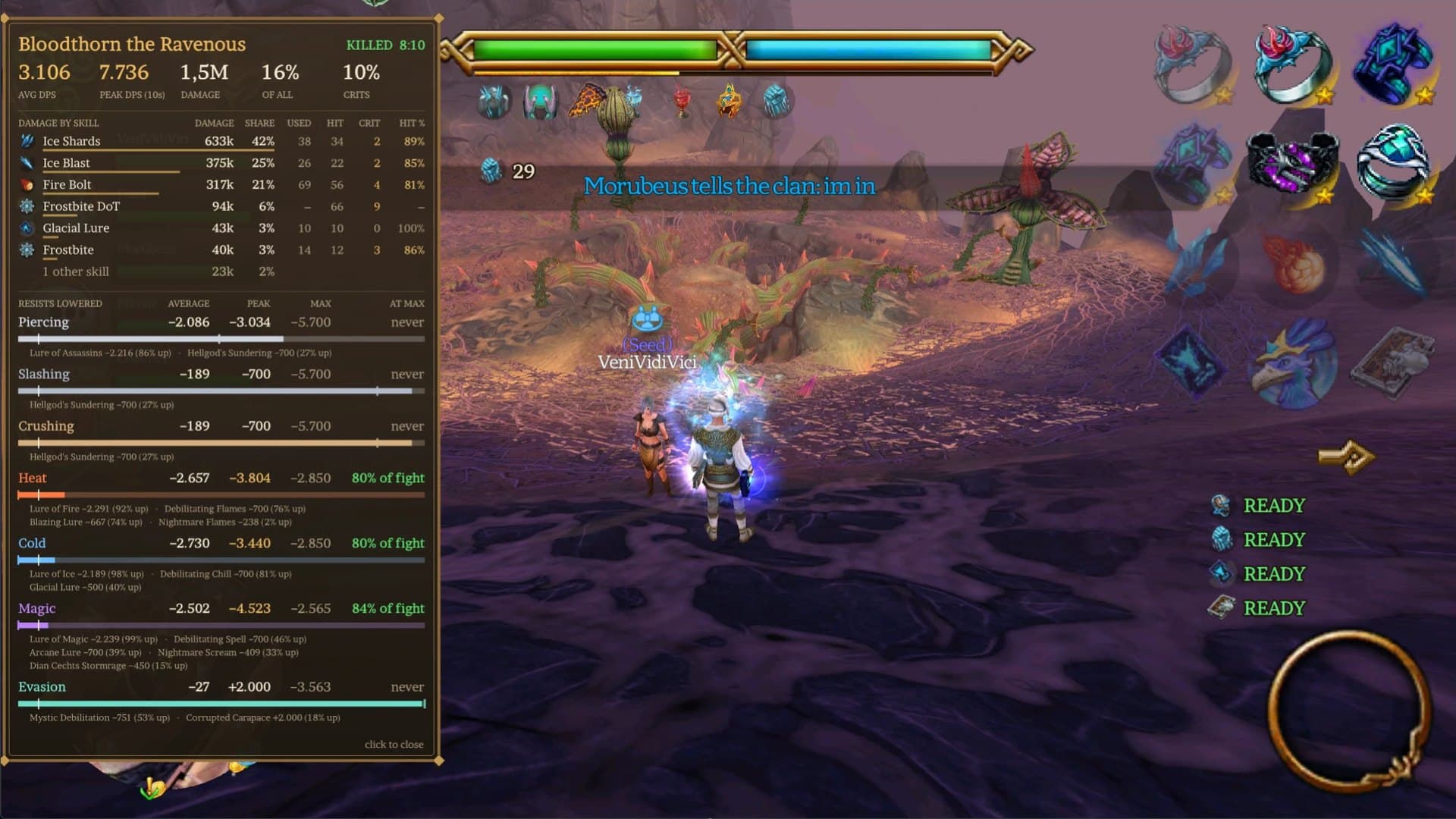
The Codex Overlay in game: the kill summary after a Bloodthorn kill, with cooldowns ready on the right

Debuffs & DoTs

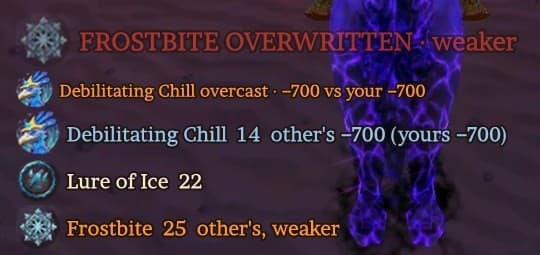
Know your debuffs are up

Every debuff and DoT you put on your target, with a timer. Someone overcasts your Lure of Ice? You see whose it is now and how much resist each one removes. Only a weaker overcast sets off the big warning, and anything about to run out pulses red with a sound.

  • checkOvercast detection, compared by the resist each lure removes
  • checkWatch any debuff on the mob, whoever cast it, set per character
  • checkBig, pulsing warning in a debuff's last 5 seconds, with its own sound choice
Know your debuffs are up

Kill summary

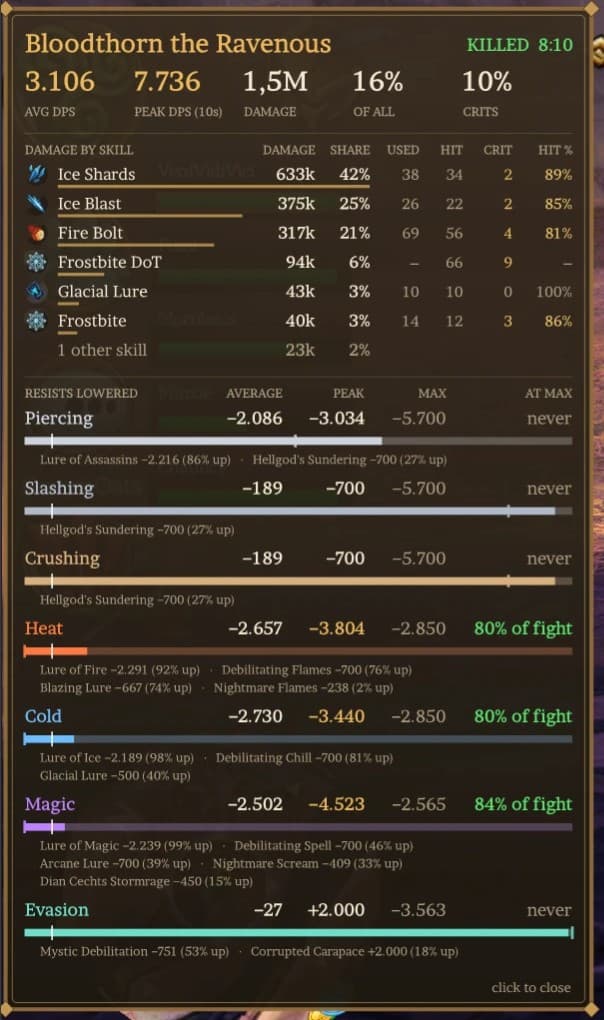
An in-depth summary after every kill

Average and peak DPS, your share of all damage, crits, and damage per skill with how often you used it, how often it hit and how often it crit. Plus how far your group lowered each resist: average, peak, the most the game allows on that mob, and how long you sat at that limit.

  • checkReopen any recent fight from the menu
  • checkEverything is also saved to a fight log
  • checkResist debuffs listed per stat, with uptime
An in-depth summary after every kill

Live mob stats

Hover the HP bar, read the mob

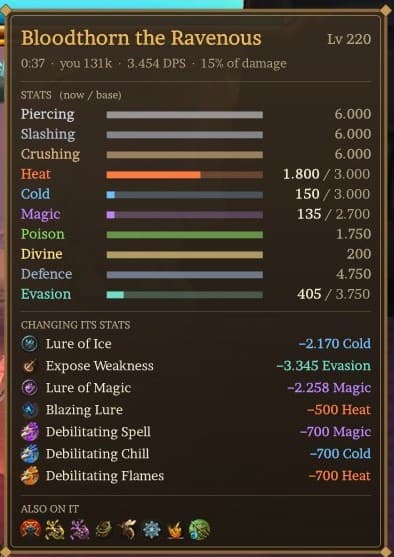
Rest your mouse on the target's HP bar for a live card: every resist as now / base, the debuffs changing it and by how much, and what else is on the mob. Base values for over 8,000 mobs.

  • checkResists and defence with the game's 5% floor, evasion down to 0
  • checkEach debuff with its exact amount
  • checkYour fight so far: time, damage, DPS, share
Hover the HP bar, read the mob

Damage numbers

Damage numbers you can actually read

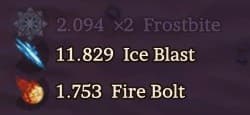
Your hits rise slowly into place and fade out, crits pop in gold, and a DoT is one line that counts up its total instead of a flood of ticks. A per-mob DPS meter sits wherever you want it.

  • checkDoT ticks summed per application
  • checkMisses, dodges and resists in grey
  • checkDPS for the mob you're fighting, 0 when it dies
Damage numbers you can actually read

Panel settings

Customize the overlay

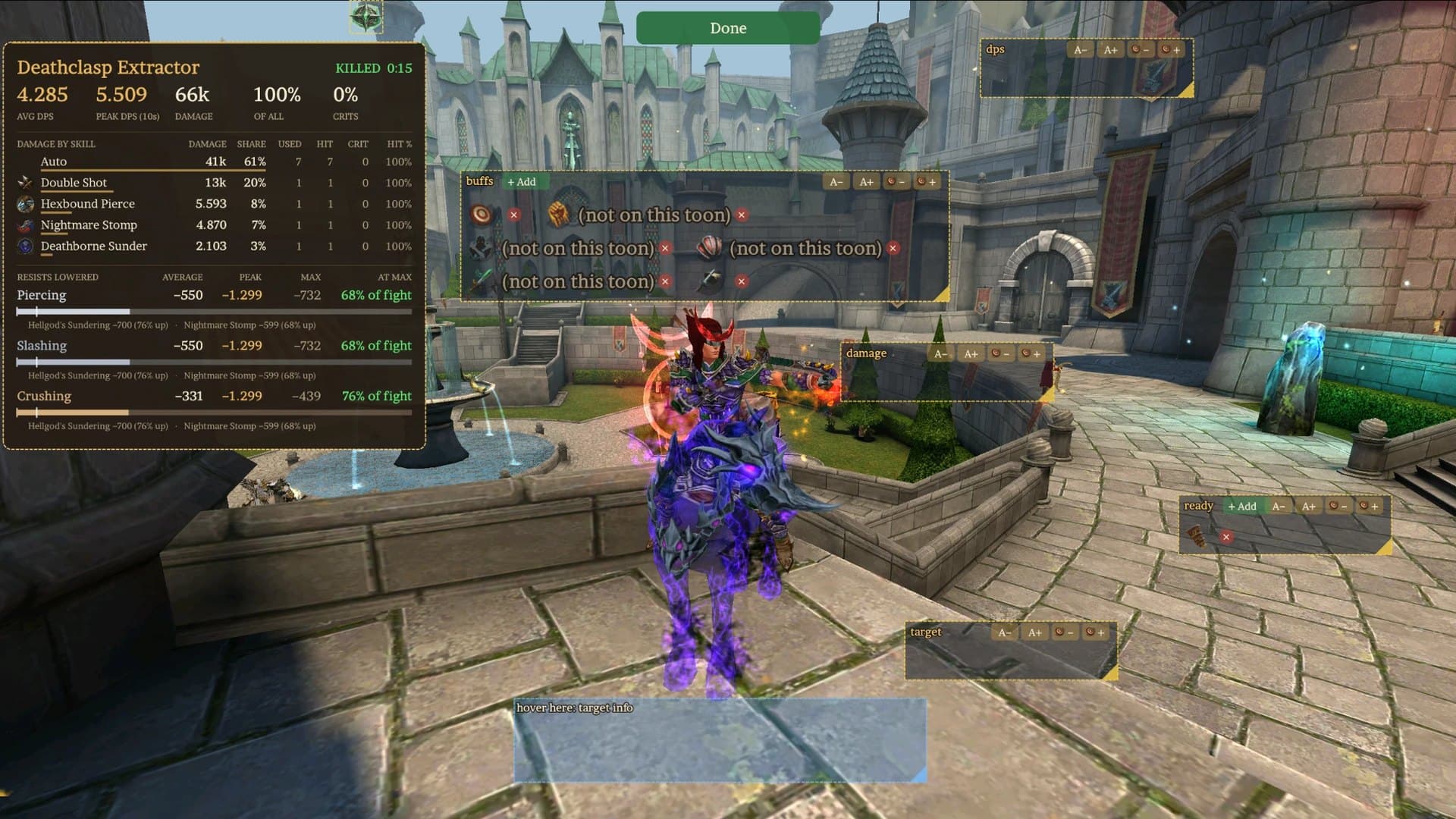
Open Customize in the app, on Windows or Android, and every panel shows on a preview of the game. Drag panels where you want them, size each one on its own, hide what you don't need, and pick the buffs, debuffs and cooldowns you care about. Pick a character and everything is its own, so your ranger and your mage each get their own setup, each with its own sounds, and the preview shows exactly what that character gets.

Changes show in the running overlay straight away. In game, Panel settings in the Codex menu still lets you drag panels into place on top of the real game.

Panel settings: every panel shown as a box with size buttons, resize corners and + Add / × for buffs and cooldowns

New in 1.5.2 · Experimental

Presets: your whole loadout, one click

Save a character's gear, jewellery, fashion, stables and every hotbar set as a preset, then switch between them with Apply: your tank set, your DPS set, your boss set. Edit any slot from the items and skills that character has, without touching the game until you apply.

warningUse at your own risk

Everything else in the overlay only reads the game's traffic. Presets is different: to change your gear and hotbar it calls into the game inside LDPlayer. It is experimental and not supported by the game's developers. Stay out of combat and close game menus while applying, and check your gear afterwards.

Windows with LDPlayer 9 and Celtic Heroes 6.16.0 only for now. The items have to be on that character already; bank and mail aren't used. The app walks you through a one-time setup:

  1. 1Install Python 3Get the 64-bit installer from python.org and tick "Add python.exe to PATH".
  2. 2Turn on root in LDPlayerLDPlayer 9: Settings › Other settings › ROOT permission › Enable, then restart LDPlayer.
  3. 3Click InstallOpen Presets in the app with LDPlayer running and click Install. It downloads Frida (about 100 MB) and sets up LDPlayer.
  4. 4Save and switchLog in, click New preset, and Apply it whenever you want that loadout back.
timer

Buff countdowns

Steady Aim, Sharpen Weapons, Attunements, Protective Stance and more: big timers that turn red and sound before they drop, and a clear DOWN when they're gone.

bolt

Cooldown lights

A READY light for the cooldowns you pick, per character, timed from the cooldown the server sends. A beep when ready, a warning just before, or both.

tune

Make it yours

Drag, resize and scale every panel, let one grow upward to line up with the HP bar, pick icons only or names, and switch between the Celtic and Modern themes.

history

Fight history

Every fight is saved. Open Fight history, even without the game: search by name or mob, show only bosses, sort by any column, name or delete fights, and save or copy any summary as a picture.

How it works

It only listens

The game tells your client about every hit, buff and debuff. The overlay reads that same traffic on your own PC or phone and turns it into timers, warnings and summaries. It never changes the game, never sends anything, and never asks for account details.

Old mob base stats come from the Masters Grimoire database (Shout out to Furyion), new mob base stats come from my own findings, and resist changes are calculated with the game's own formulas, including the 5% floor on resists and defence (evasion can go to 0). Fights and settings are stored next to the program, on your PC only.

The one exception is Presets: once you install it, Apply changes your gear and hotbar inside the game. Use it at your own risk.

Install guide

Up and running in a minute

  1. 1

    Download and unzip

    Unzip the folder anywhere you like, for example your Documents.

  2. 2

    Open CodexOverlay.exe

    Windows may show "Windows protected your PC": click More info, then Run anyway. In the app, click Start overlay, Yes on the admin prompt, and Allow if the firewall asks.

  3. 3

    Play

    Start Celtic Heroes in LDPlayer, BlueStacks, MuMu, Nox, MEmu or the Steam / PC client. The overlay finds the game window and sits on top of it.

  4. 4

    Make it yours

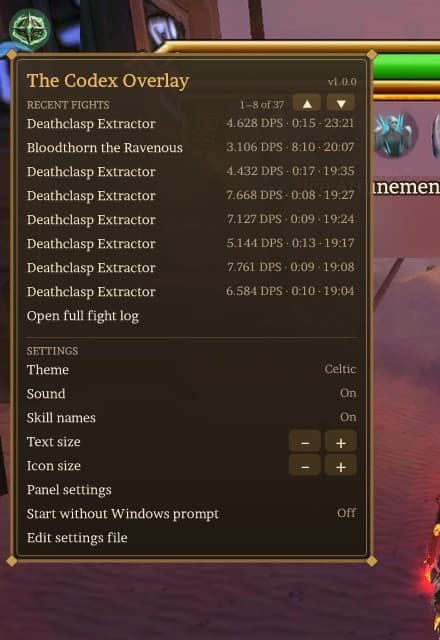
    Customize in the app sets up every panel on a preview, no game needed. In game, hover the Codex button for recent fights and settings.

Tip: skip the admin prompt

In the app's Settings, turn on Start the overlay without the Windows admin prompt. You approve it once, and from then on the overlay starts straight away.

Notices

If the overlay can't do its job yet, a small notice next to the Codex button says why, like Use a skill once or No mob data found: please relog or switch areas. It goes away by itself.

Verify your download

SHA-256 of CodexOverlay-1.5.2.zip:

2ab4523c12b7cbb79f5c91ea7a1320ba191a542691b7aca6a57c8019eff355c6

In PowerShell: Get-FileHash CodexOverlay-1.5.2.zip

Android

On your phone too

The same buff and debuff timers, damage feed, DPS, cooldowns, kill summaries and live mob stats, on top of the Android game. Tap the Codex button for the menu, hold the target's HP bar for its stats, and drag and size every panel with your finger. Phone screenshots leave overlays out, so any kill summary can be saved as a picture, and the app keeps your fight history with search and a filter for bosses. It isn't on the Play Store, so you install the APK from this page.

  1. 1

    Download the APK

    Open this page on your phone and tap Download for Android.

  2. 2

    Install it

    Open the downloaded file. Android asks to allow installs from your browser the first time: allow it, then tap Install. If Play Protect warns about an unknown app, choose Install anyway.

  3. 3

    Start the overlay

    Open Codex Overlay and tap Start overlay. Allow "Display over other apps", come back, tap Start again and accept the VPN connection.

  4. 4

    Play

    Open Celtic Heroes. Tap the Codex button for the menu, and hold your finger on the target's HP bar to see its live stats.

Why it asks for a VPN

Android doesn't let one app read another app's traffic any other way. The VPN stays on your phone and only carries Celtic Heroes' connection to its game server: everything else on your phone bypasses it, and nothing is sent anywhere. While it runs you can't use another VPN. Stop it any time from the notification.

androidDownload for Android v1.3.2

Verify your download

SHA-256 of CodexOverlay-1.3.2.apk:

ca0b23170a5da00c7c94f0eaa0c8f04b85154b7ee474023892051fefe0cb77a1

Changelog

What's new

The app updates itself: when a new version is out, it shows an Update button.

  1. v1.5.2Latest

    Oct 22, 2026

    • New: Presets (experimental, LDPlayer 9): save a character's gear and hotbar and switch with one click, with a guided setup in the app.
    • The Presets page scrolls on small windows instead of squashing.
  2. v1.5.1

    Oct 21, 2026
    Android 1.3.2

    • Sharp on high-DPI screens (150% and up).
    • A fight's card opens in a drawer and lists every skill used, also ones that did no damage; long skill names no longer overlap.
  3. v1.5.0

    Oct 21, 2026

    • A redesigned app: one sidebar that folds to icons, a dark-and-gold look, clearer sound choices and simpler Settings.
    • Fight history: name, rename and delete fights, sort on every column.
  4. v1.4.3

    Oct 21, 2026

    • Ready cooldowns keep showing READY, and their beep plays again.
  5. v1.4.2

    Oct 19, 2026
    Android 1.3.1

    • Evasion debuffs can take evasion all the way to 0 (resists and defence keep the 5% floor).
  6. v1.4.1

    Oct 17, 2026
    Android 1.3.0

    • Android gets the same Customize screen as Windows.
    • A cooldown only beeps when it has just come ready.
  7. v1.4.0

    Oct 17, 2026
    Android 1.2.1

    • Everything per character: buffs, debuffs and cooldowns, each with its own sound.
    • Panels can grow upward, the app hides to the tray, and many accuracy fixes.
  8. v1.3.0

    Oct 15, 2026
    Android 1.2.0

    • The overlay opens as an app: Customize with a live preview, Fight history, Settings and Update.
    • Watch any debuff on your target, whoever cast it.
  9. v1.2.1

    Oct 14, 2026

    • Works on the Steam / PC client.
  10. v1.2.0

    Oct 14, 2026
    Android 1.1.6

    • Area skills count on every mob they hit; base resists, defence and evasion always on the mob card.
  11. v1.1.5 – 1.1.9

    Oct 13 – 14, 2026
    Android 1.1.1 – 1.1.5

    • More accurate kill summaries: only skill uses that fired, mob heals and shields handled, fights stay open while the mob is still being fought.
  12. v1.1.3 – 1.1.4

    Oct 13, 2026
    Android 1.1.0

    • Fight history with search, a boss filter, sorting and full numbers, no game needed. Android can save summaries as pictures.
  13. v1.1.2

    Oct 13, 2026
    Android 1.0.0

    • The Android app, and updates from inside the app.
  14. v1.1.0 – 1.1.1

    Oct 13, 2026

    • First public release, then a new default panel layout.

Questions

FAQ

Why does it need admin rights?add

Windows only lets programs with admin rights read network traffic, and that's how the overlay sees combat. Turn on "Start the overlay without the Windows admin prompt" in the app's Settings to approve it once and skip the prompt from then on.

Is it safe? Can I get banned?add

The combat overlay only listens to the game's traffic on your own PC or phone: it doesn't change the game, sends nothing, and needs no account details. Presets is different and optional. It does nothing until you install it, and when you click Apply it changes your gear and hotbar by calling into the game inside LDPlayer. That carries more risk than reading traffic, which is why it's marked experimental. Both are third-party tools, not supported by the game's developers: you use them at your own risk under the game's terms.

My antivirus or Windows warns about it.add

New programs that aren't code-signed yet and that read network traffic often trigger warnings from SmartScreen and some machine-learning scanners. Compare the file's SHA-256 checksum with the one on this page to make sure it's the original.

It says "Use a skill once" or "No mob data found".add

Use any skill so the overlay can find your character, and relog or switch areas so it can load the mobs around you. Both notices disappear by themselves.

I play several characters at once.add

It follows the emulator window in front and the character you last acted with.

How do I update?add

When a new version is out, the app shows an Update button (on Android also in the Codex menu). On Windows it downloads, checks and restarts by itself; on Android it downloads the new version and Android asks you to confirm the install. Overlay 1.1.1 and older can't update themselves: download the latest from this page once.

Why does the Android app use a VPN?add

Android doesn't let one app read another app's traffic any other way. The VPN stays on your phone: it only carries Celtic Heroes' connection to its game server, passes it on unchanged and reads the combat messages on the way. Nothing is sent anywhere else. While it runs you can't use another VPN.

Does it work on iPhone?add

No. iOS doesn't allow an app to read another app's traffic or draw on top of it, so an iPhone version isn't possible.

How do I uninstall it?add

Windows: turn "Start without Windows prompt" off in the menu if you turned it on, then delete the folder. Android: uninstall Codex Overlay like any app.

Missing something? Found a bug?

Feature requests and bug reports are welcome. Find me as TechNick (@Nickaww) in the official Celtic Heroes Discord. A screenshot helps a lot.

Open the Discordarrow_outward

The Codex Overlay is a free, unofficial tool and is not affiliated with the developers of Celtic Heroes. Font: Brawler (SIL Open Font License 1.1). Mob base stats: the Masters Grimoire database.